
Have you ever clicked on a link and ended up on a frustrating “404 Page Not Found”? That’s a broken link—and it’s more common (and harmful) than you might think.
Broken links silently harm your website by damaging the user experience, affecting your SEO rankings, and lowering your site credibility. Whether you’re a blogger, business owner, or digital marketer, it’s essential to regularly check for broken links to keep your website error-free.
In this blog, you’ll learn what broken links are, how to check for broken links using free and premium tools, and how to fix them step by step. Let’s dive into the world of broken links and clean up your site for better performance and rankings.
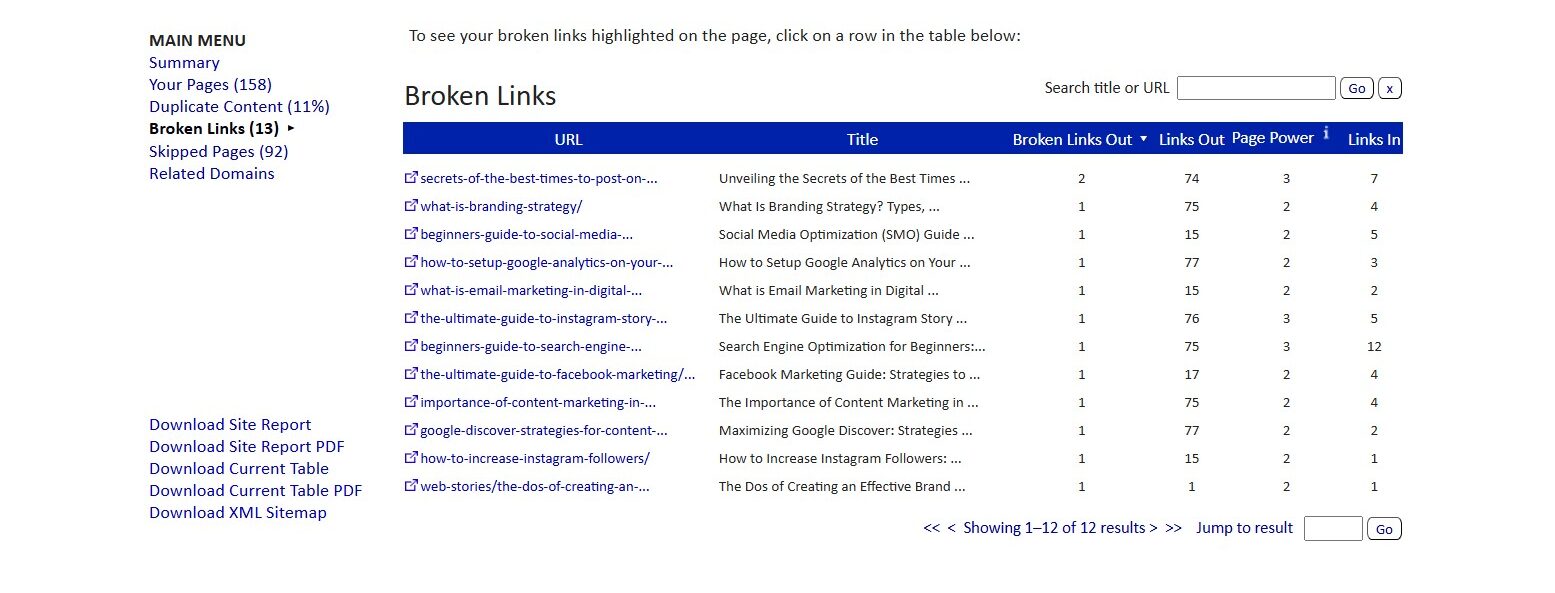
Broken links (also called dead links or link rot) are hyperlinks on a website that no longer lead to their intended destination. When a user clicks on one, instead of reaching the right content, they see an error page like:
These broken links can be internal (pointing to pages on your own website) or external (pointing to other websites).
Suppose your blog post includes this link:
https://yourwebsite.com/free-seo-guide
But later, you delete or move that page. Now, any visitor who clicks that link will land on a 404 error page—that’s a broken link.
Broken links may seem minor, but they quietly hurt your website’s credibility, user experience, and search engine visibility.
At first glance, a broken link might seem like a small issue—but it can cause big damage to your website’s performance, reputation, and search visibility. Here’s why you shouldn’t ignore them:

Imagine clicking on a blog or product link expecting helpful information, but instead, you see a “404 Page Not Found” error. Frustrating, right?
When visitors encounter broken links, they lose trust and might leave your site immediately—raising your bounce rate.
Search engines like Google expect well-maintained sites. If you don’t regularly check for broken links, it may signal low-quality content and affect your rankings.
Broken internal links also affect how search engines crawl and index your pages, which means some of your important content might not get discovered at all.
If your website has several dead links, visitors may assume your content is outdated or not trustworthy. This is especially harmful for business websites, blogs, or e-commerce platforms where trust is crucial.

If a link to a contact page, signup form, or product page is broken, you might be losing valuable leads or customers without even knowing it. Every broken link is a missed opportunity to engage or convert a visitor.
You can manually check every link—but that’s time-consuming. Here are smart tools and methods to help:
Here are some popular ones:
These tools crawl your website and generate reports showing:
Once you’ve identified broken links on your website, the next step is to fix them. Luckily, fixing broken links is a simple process—you just need to understand why the link is broken and choose the right method to repair it.
Here’s how you can fix broken links step by step:
If the link is broken because the page was moved or the URL changed, simply update the hyperlink with the new, correct URL.
Example: If a blog post moved from example.com/blog1 to example.com/new-blog1, just replace the old URL in your content.
If the content the link points to no longer exists and there’s no replacement, it’s best to remove the hyperlink from your text. This keeps your content clean and avoids frustrating your visitors.
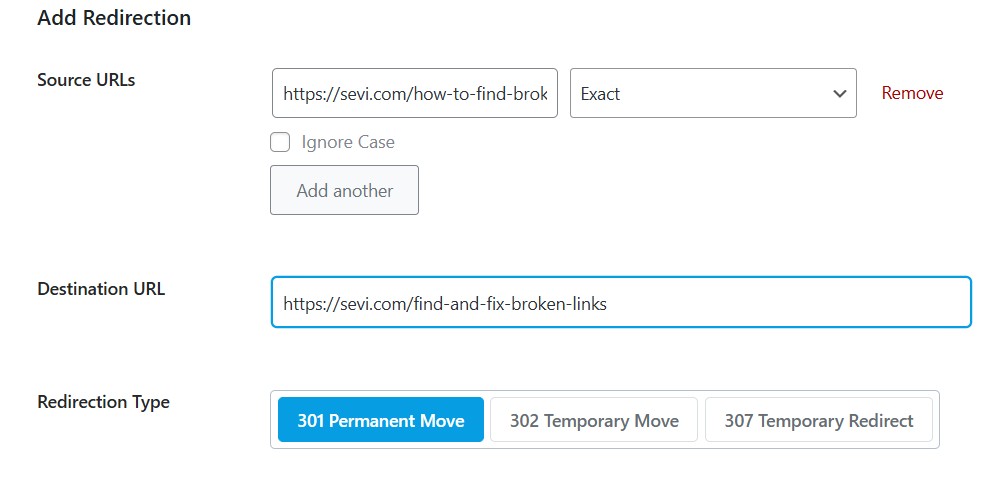
A 301 redirect automatically sends users (and search engines) from the broken URL to a new relevant page. This is great for maintaining SEO value if an old page has backlinks pointing to it.
If you’re linking to another website and their page is down or missing, try reaching out to them. They might have updated the link or moved the page to a new location. If they don’t respond, you can replace the link with a similar one from a different reliable source.

Fixing broken links is important—but preventing them from happening in the first place is even better! Here are some smart and practical tips to avoid broken links on your website:
When linking to your own pages, always double-check the URL. Avoid linking to pages that are temporary or likely to be deleted later. Also, use relative links when possible (like /contact instead of https://yourdomain.com/contact) to make your site structure more stable.
Old blog posts or pages may have outdated links. Set a reminder to review and update older content every few months. This helps keep your site relevant and reduces the chances of broken links piling up.
If you use WordPress, tools like Broken Link Checker or Rank Math can monitor your site for broken links automatically. They’ll alert you as soon as a problem arises, so you can fix it before visitors notice.
Be cautious when linking to websites that are not actively maintained or look spammy. These websites are more likely to go offline or change URLs without notice. Always prefer trusted, long-standing sources.
Even with the best prevention, a few broken links might still happen. A helpful and well-designed custom 404 page can guide users back to your homepage or suggest other content instead of leaving them stuck.
Make it a routine to run a broken link check once every 1–3 months using the tools mentioned earlier (like Ahrefs, SEMrush, or Broken Link Checker). A little regular maintenance goes a long way in keeping your website clean and error-free.
Broken links can hurt your SEO and user trust. Regular monitoring and timely fixes help maintain a healthy, user-friendly website. Use the tools mentioned above, create a maintenance routine, and always keep your content updated.