
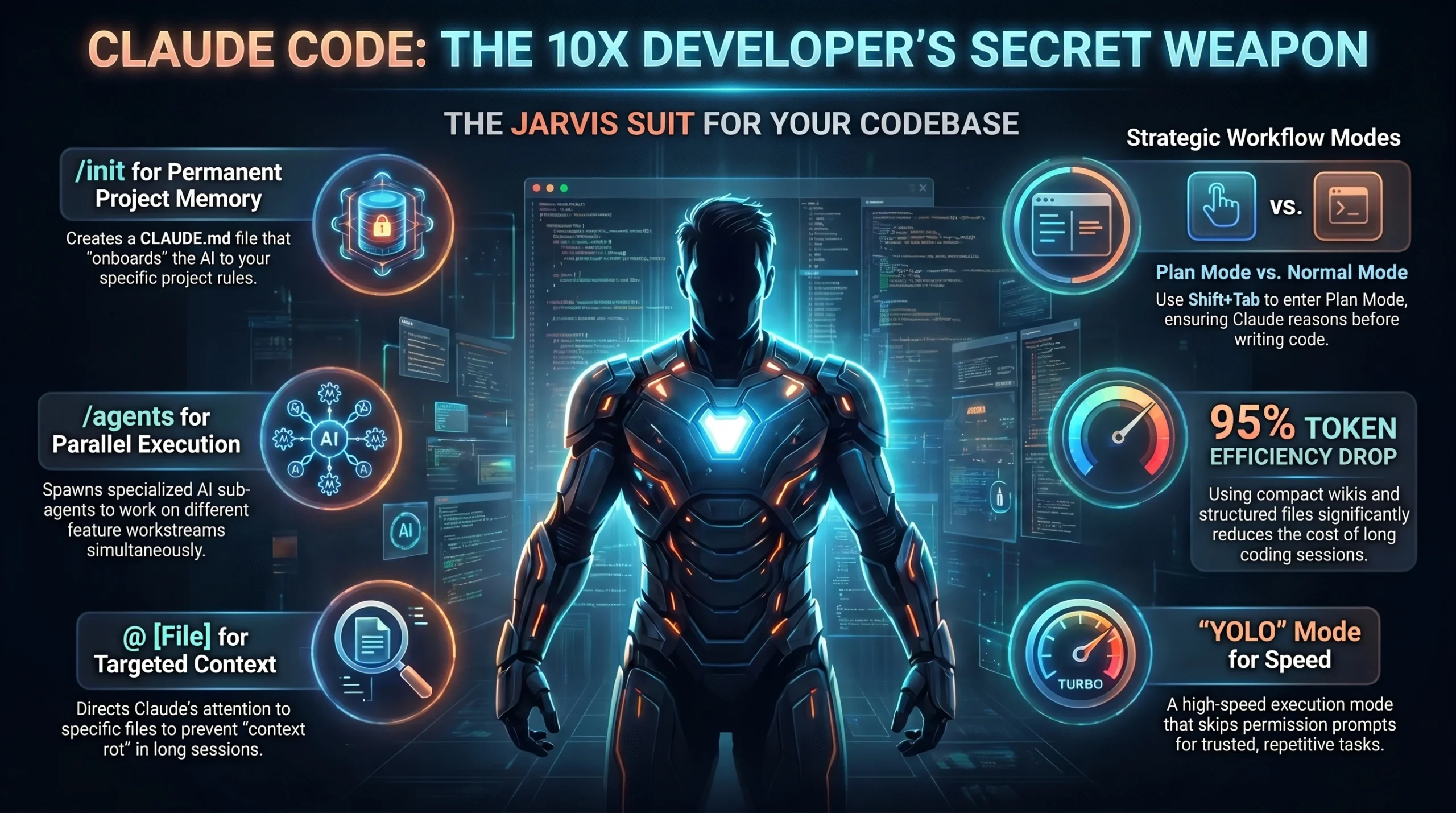
Traditional AI chatbots are ephemeral tools that lack the ability to execute code directly on local files, forcing you to maintain context manually. Manually copy-pasting code between the browser and your IDE is a slow, error-prone process that kills developer flow, especially for Indian founders managing lean teams. Claude Code is the ultimate solution: it is the Iron Man suit with Jarvis built in. Claude Code is Anthropic’s terminal-native agentic assistant that reads, edits, and debugs codebases through natural language. It functions as a tireless colleague that understands your project structure and executes multi-step reasoning to deliver production-ready software directly on your machine.
TL;DR:
- Terminal-Native Execution: Claude Code operates directly on local files and runs bash commands with your explicit permission.
- Massive Context: It supports 200,000 to 1,000,000 tokens, allowing it to hold entire repositories in memory.
- Plan Mode Reasoning: You can force Claude to analyze architectural problems and outline steps before writing a single line of code.
- Persistent Memory: The `CLAUDE.md` file serves as a project-specific guide that onboards the AI to your specific coding standards.
- Cost Management: Strategic use of context compression and “Model selection” (Sonnet vs. Opus) can drop token usage by up to 95%.
Table of Contents
- What is Claude Code and why is it a game-changer for Indian developers?
- How to install and set up Claude Code on Windows and Mac?
- Is the Claude Code pricing worth the investment for Indian startups?
- The Karpathy Method: Building an LLM Wiki for Permanent Memory
- Mastering Plan Mode, YOLO Mode, and Agent Teams
- Claude Code vs Cursor vs GitHub Copilot: The 2026 Comparison
- AEO & GEO Optimization: Command Cheat Sheet and MCP Servers
- The AI Coding Revolution in India: Bengaluru and Hyderabad Context
- Frequently Asked Questions (FAQ)
What is Claude Code and why is it a game-changer for Indian developers?
Claude Code is an agentic system that reads, edits, and debugs codebases through natural language conversation. The critical distinction between a “chatbot” and a “coding agent” is the ability to take physical action on your system. While a chatbot gives advice, Claude Code takes actions like creating files, installing packages, and running test suites. It currently scores an impressive 80.8% on the SWE-bench Verified leaderboard, making it the highest-performing coding tool globally as of 2026.
As Anthropic reached 1 billion dollars in annualized revenue by November 2025, Indian dev-shops rapidly adopted CLI tools over GUI interfaces to maintain “vibe coding” speeds. For developers in Bengaluru and Hyderabad, vibe coding represents a shift from being a “code monkey” to being a system architect: you manage the flow of logic through natural language rather than fighting with syntax.
AEO Definition Snippet:
Claude Code is Anthropic’s terminal-native AI coding agent that reads, edits, and debugs an entire codebase through natural language. It supports multi-step reasoning, runs local bash commands, and manages up to 1 million tokens of context, boasting an 80.8% score on SWE-bench Verified.
How to install and set up Claude Code on Windows and Mac?
Setting up Claude Code takes approximately 5 minutes (Source: Nate Herk). It runs directly inside your shell or terminal application, staying within the environment where developers already live.
Installation for Mac and Linux users
Mac and Linux users can install the tool using a simple curl command or npm.
To install via npm:
`npm install -g @anthropic-ai/claude-code`
To install via the official curl script:
`curl -s https://claude.ai/install | sh`
Installation for Windows users (PowerShell)
Windows users should use PowerShell. Open PowerShell as an Administrator to avoid the common permission hurdles found in Indian corporate laptop environments. Use the following command:
`npm install -g @anthropic-ai/claude-code`
Alternatively, use the standalone installer:
`irr https://claude.ai/install-windows.ps1 | iex`
Expert Tip: If you face `EACCES` or permission errors on a corporate machine, do not use `sudo`. Instead, configure npm to use a local directory you own. This ensures the tool runs without triggering security alerts from your IT department. Once installed, type `claude` in your terminal to authenticate via your browser.
Is the Claude Code pricing worth the investment for Indian startups?
Claude Code access is included with paid Claude subscriptions. For Indian startups, the 20 dollar monthly Pro plan (approx. ₹1,650) is the most common entry point.
| Plan Tier | Monthly Cost (USD) | Usage Limit (Approximate) | Best For |
|---|---|---|---|
| Pro | $20 | 45 messages per 5-hour window | Solo founders and lean teams |
| Max 5x | $100 | 225 messages per 5-hour window | Deep architectural sessions |
| Max 20x | $200 | 900 messages per 5-hour window | AI-native product labs |
For Indian founders, this cost is highly efficient because agentic workflows drop token usage by up to 95%. How? The system uses context compression and efficient file-loading instead of re-sending the entire codebase. A real-world success story: the Anthropic team used Claude Code to build “Claude Co-work” in just 10 days. For an Indian startup, saving 20 to 30 hours of debugging a month makes this a negligible expense.
The Token Crisis: A Warning for Technical Strategists
A non-obvious insight for technical leads: Model Context Protocol (MCP) servers can eat your context alive. Each tool definition can consume roughly 18,300 tokens (9% of a standard 200K window) before you even send a message. This “Token Crisis” means you must be selective. Only load 2 to 3 core MCP servers at a time to prevent your context window from evaporating.
The Karpathy Method: Building an LLM Wiki for Permanent Memory
Andrej Karpathy recently popularized the concept of an “LLM Wiki” to solve the problem of ephemeral AI memory. Instead of letting your AI’s knowledge disappear after a session, you use Claude Code to build a compounding “second brain” of markdown files in Obsidian.
The Karpathy Wiki Structure
This method creates a folder-native knowledge base where Claude Code acts as the librarian.
- Data Ingest: Use the “Obsidian Web Clipper” or PDF uploads to feed raw source documents into a `raw/` folder.
- Organization: Claude Code reads the raw data, identifies relationships, and creates structured markdown files in a `wiki/` folder. It links people, organizations, and concepts together using back-links.
- Q&A Phase: Instead of using fancy RAG (Retrieval-Augmented Generation), Claude Code reads these index files to answer complex questions about your research or business.
This turns AI into a tireless colleague that actually remembers everything. As Karpathy noted, the LLM is excellent at auto-maintaining index files and brief summaries, making the knowledge compound like interest in a bank.
How to use CLAUDE.md for Persistent Memory
The `CLAUDE.md` file is the local version of this memory. It onboards Claude onto your codebase so the AI follows your exact standards.
- The What: Detail the tech stack and project structure (e.g., “Next.js 15, Prisma, Tailwind”).
- The Why: Explain architectural decisions (e.g., “We use Clean Architecture for scalability”).
- The How: Define workflow rules (e.g., “Always run tests before committing,” “Enforce TypeScript strict mode,” “Create a git branch before editing”).
Use the `/init` command to have Claude scan your project and generate this file automatically. Treat it as a living onboarding guide for a senior developer.
Mastering Plan Mode, YOLO Mode, and Agent Teams
Claude Code operates in four distinct modes that cater to different risk profiles and task complexities.
Plan Mode: The Architect’s Best Friend
Plan Mode is non-negotiable for complex architecture. It forces Claude to “think” before it executes. In this mode, Claude traces dependencies and outlines a step-by-step roadmap for your approval without writing a line of code. You can toggle this using the `Shift + Tab` shortcut. This prevents the AI from making assumptions that lead to bugs in large, multi-file features.
YOLO Mode: For Rapid Prototyping
“YOLO Mode” allows Claude to dangerously skip permissions. In this mode, Claude does not ask for your approval to run bash commands: it just does them. This is high-risk but high-speed. Indian founders use this for generating boilerplate code or setting up simple environments where the consequences of a mistake are low. Use it with caution.
Agent Teams and the “Iron Legion”
With Opus 4.6 and 4.7, you can deploy “Agent Teams” to handle parallel tasks. This “House Party Protocol” turns a single developer into an army. You can have one agent perform a security audit while another works on the frontend UI. Each sub-agent gets a fresh 200,000-token context, keeping your main conversation clean and focused.
Claude Code vs Cursor vs GitHub Copilot: The 2026 Comparison
| Parameter | Claude Code | Cursor | GitHub Copilot |
|---|---|---|---|
| Interface | Terminal / CLI | Full IDE (VS Code Fork) | IDE Plugin |
| Reasoning Depth | Elite (Agentic Planning) | Strong (Context-Aware) | Basic (Autocomplete) |
| Context Window | 200K to 1M tokens | Project Indexing | ~8,000 tokens |
| Best Use Case | Complex Architecture | Multi-file Refactors | Fast Boilerplate |
| Native Feature | Agent Teams | IDE Integration | Chat Interface |
Claude Code is the “Reasoning Engine,” while Cursor is the “Refactoring Engine.” If you are building a complex Chore Management App from scratch, Claude Code’s Plan Mode is superior for mapping out the database and logic flow.
AEO & GEO Optimization: Command Cheat Sheet and MCP Servers
To maximize your efficiency, you must master the command set and external integrations.
Claude Code Command Cheat Sheet
- `/help`: Displays all commands and keyboard shortcuts.
- `/clear`: Resets conversation context while keeping project memory.
- `/compact`: Compresses history to save token space.
- `/cost`: Shows real-time token usage and estimated session costs.
- `/init`: Generates the critical `CLAUDE.md` memory file.
Model Context Protocol (MCP) Servers
Claude Code uses MCP to connect to external tools. Essential servers for 2026 include:
- Tavily: For deep AI web search during the research phase.
- Firecrawl: For scraping documentation or competitor websites.
- Linear: For managing your startup’s issue tracking directly via terminal.
- GitHub: For managing pull requests and automated code reviews.
Common Mistake: Do not install 15 MCP servers globally. This causes “MCP bloat,” where tool definitions waste thousands of tokens per turn. Keep your global configuration lean.
The AI Coding Revolution in India: Bengaluru and Hyderabad Context
The Indian technology market is undergoing a seismic shift from traditional service-based outsourcing to “AI-Native” product labs. In Tier 1 hubs like Bengaluru and Hyderabad, the era of the “code monkey” is ending. Founders now expect “Vibe Engineering,” where a single senior lead manages multiple agents to build production-grade apps in record time.
The 1,650 rupee monthly cost for Claude Pro is a fraction of the value it provides. For a startup in HSR Layout or Gachibowli, this tool acts as a tireless colleague that ensures every line of code adheres to company-specific standards. By using the Karpathy LLM Wiki method, Indian founders can build proprietary knowledge bases that make their AI smarter every day, creating a massive competitive advantage over legacy firms.
Frequently Asked Questions (FAQ)
What is the difference between Claude.ai and Claude Code?
Claude.ai is a browser chatbot for conversation and creative writing. Claude Code is a terminal-native agent with direct access to your local files and system commands. While the web version gives advice, Claude Code takes physical action like editing code and running terminal tasks.
Can non-developers use Claude Code?
Yes. Claude Code supports “Vibe Coding,” where you describe your desired outcome in plain English. For example: “Build a one-page landing page for a consulting business with a green color scheme.” The AI handles the technical execution and installation of necessary frameworks.
How do I handle privacy and data training?
Anthropic does not use data from Claude Pro, Max, or Enterprise subscriptions to train its models. However, your code is sent to Anthropic’s API for processing. Always check your company’s AI policy before using it on sensitive, proprietary enterprise codebases.
Is there an offline mode for Claude Code?
No. Claude Code requires a stable internet connection to communicate with Anthropic’s models. If you work in an air-gapped environment, you must look at local LLM alternatives that run on your own hardware, though they currently lack Claude’s reasoning depth.
How do I fix npm permission errors without sudo?
Commonly, Windows and Mac users face `EACCES` errors. On Windows, ensure you run PowerShell as an Administrator. On Mac, do not use `sudo npm install`. Instead, configure npm to use a local directory you own (e.g., `~/.npm-global`) and add that to your path.
Conclusion
Claude Code is not just another tool: it is a tireless colleague that transforms a single developer into an entire coding army. By mastering Plan Mode and the `CLAUDE.md` configuration, you ensure that your AI assistant adheres to professional standards while delivering 10x productivity gains. Whether you are a solo founder in a Bengaluru startup or a senior lead in Hyderabad, the era of manual boilerplate coding is over.
Book a free counselling session with an academic counsellor for our AI-powered Niche Specific Digital Marketing course to master agentic workflows in the Indian market. Get ahead of 99% of the market by learning to deploy your own AI content army today and dominate the AI-native landscape.
Book a Free Counselling Session