
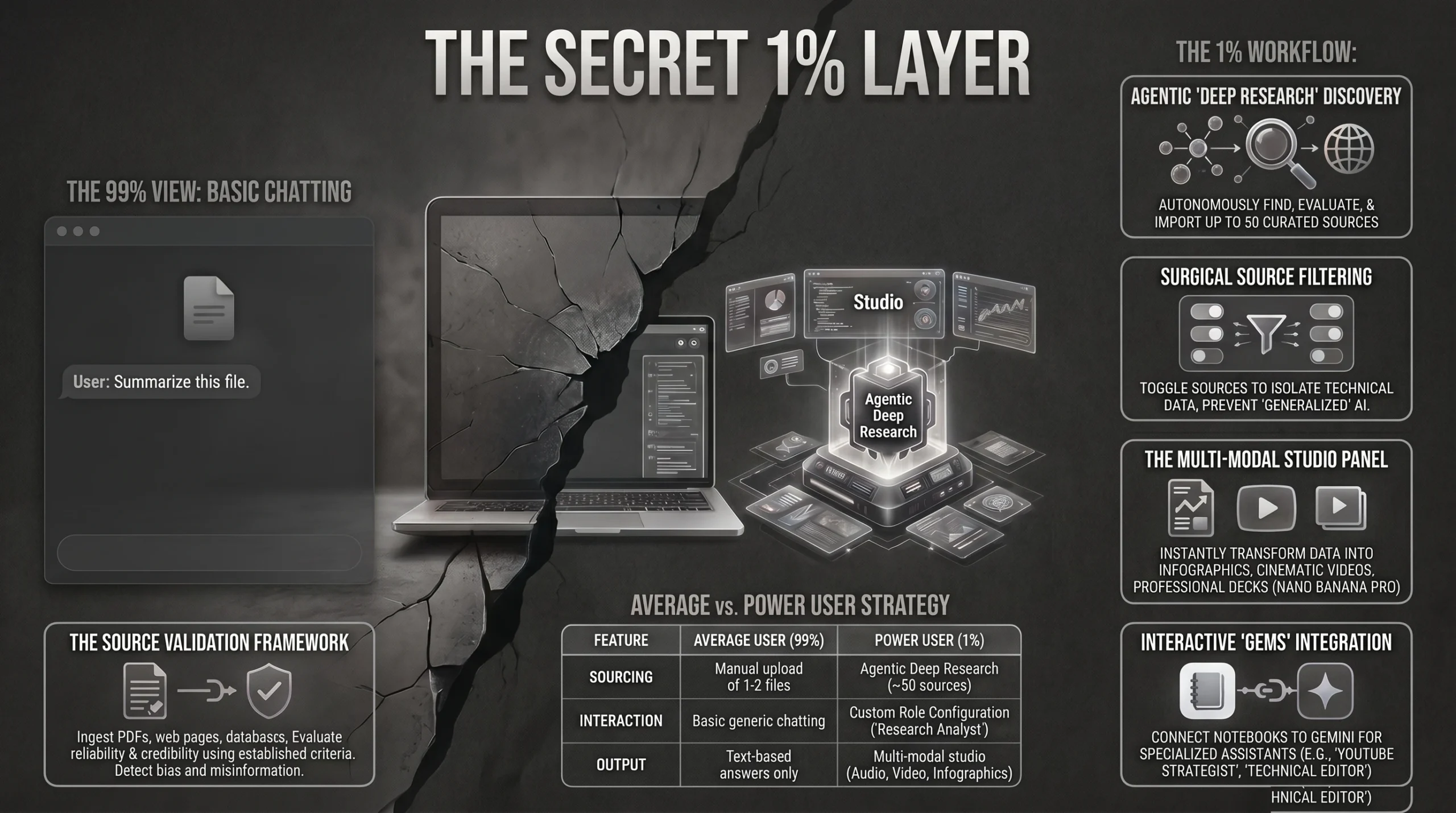
Most users treat AI like a basic chatbot by uploading a few files and asking simple questions. This approach leads to surface-level summaries, hallucinations, and missed insights that fail to leverage the true power of the platform.
When you use AI incorrectly, you risk building business strategies on flawed information and incomplete data sets. To use NotebookLM better than 99% of people, you must move beyond basic uploads and implement a three-step workflow of Deep Research sourcing, rigorous source validation, and multi-modal studio transformation.
This transforms the tool from a simple chat interface into a professional Research Intelligence System. By mastering this agentic workflow, you ensure every insight is grounded, cited, and ready for high-level professional application.
TL;DR (Quick Takeaways)
- Deep Research Sourcing: Use the agentic Deep Research feature to autonomously find and curate up to 50 relevant sources from across the live web.
- Rigorous Validation: Implement a three-step prompt framework to verify author credibility, identify contradictions, and map information gaps.
- Multi-Format Landscape: Combine PDFs, YouTube URLs, spreadsheets, and web links to build a 360-degree knowledge base.
- Surgical Context Control: Uncheck irrelevant sources for specific queries to prevent the AI from generalizing its answers.
- Studio Transformation: Leverage Nano Banana Pro to generate professional infographics, slide decks, and interactive audio debates.
- Gemini Integration: Connect your notebooks directly to the Gemini App to build specialized AI Gems like a YouTube Strategist.
- Regional Accessibility: Utilize Hindi language support for Audio Overviews to make complex research accessible to regional Indian teams.
Table of Contents
- What is NotebookLM and why is it replacing standard chatbots?
- How do you build a superior “Information Landscape” in NotebookLM?
- Why is source validation the secret to zero hallucinations?
- How can you configure NotebookLM for specific expert roles?
- How do you master the NotebookLM Studio for professional outputs?
- What are the best Indian use cases for NotebookLM in 2026?
- How do you integrate NotebookLM with Gemini “Gems”?
What is NotebookLM and why is it replacing standard chatbots?
NotebookLM is an intelligent workspace designed for learning, writing, and professional research. Unlike standard chatbots that rely on general training data, NotebookLM utilizes “Grounding.”
This means it only provides answers based on the specific documents you provide. With a massive 500,000-token context window, it can process enormous datasets, from 400-page reports to multi-hour video transcripts.
This focus on source-grounding makes it an essential tool for Answer Engine Optimization (AEO). In AEO, accuracy and citations are non-negotiable for ranking in Google’s Search Generative Experience (SGE).
To understand the precision of NotebookLM, consider the public debate around AI resource consumption. Global AI water demand is projected to reach 4.1 to 6.6 billion cubic meters by 2027.
While that sounds massive, grounded research reveals that US corn production requires 20 trillion gallons of water per year for irrigation. This is nearly 80 times more than all world AI servers combined.
NotebookLM allows you to surface these specific, verified comparisons rather than relying on general AI “guesses.” This transparency is why it is replacing traditional chat tools for serious research tasks.
| Feature | Standard Chatbots (ChatGPT/Claude) | NotebookLM |
|---|---|---|
| Primary Goal | General Assistance / Creative Writing | Deep Research and Analysis |
| Knowledge Base | General Training Data | Grounded in User-Provided Sources |
| Hallucinations | Higher (often invents details) | Massively Reduced via Grounding |
| Transparency | Occasional / No Citations | Forced In-text Citations by Default |
| Format Support | Limited to Text/PDF | Multimodal (Video, Audio, URL, PDF) |
How do you build a superior “Information Landscape” in NotebookLM?
The quality of your AI output depends entirely on your source strategy. Amateurs upload a single PDF, but professionals build a multi-format “Information Landscape.”
You should mix academic papers, YouTube lectures, and industry blog posts to create a web of information. This multi-format approach covers a topic from every possible angle.
To start, ensure your notebooks are topic-specific. Instead of a general “Notes” folder, create focused titles like “Competitive Analysis Q1 2026” or “AI Alignment Research.”
This helps the Gemini 1.5 Pro model identify relationships between related files more effectively. You have two primary ways to find data: Fast Research and Deep Research.
Fast Research performs quick web matching to find relevant links. However, Deep Research uses an agentic model that is significantly more powerful.
The Deep Research agent searches the internet, evaluates source quality, and adapts its path based on what it finds. It can autonomously discover and curate up to 50 high-quality sources.
It then generates a comprehensive research report that synthesizes these sources. This report is automatically added as a new source in your notebook, saving hours of manual labor.
Why is source validation the secret to zero hallucinations?
NotebookLM reduces hallucinations by staying grounded, but if your sources are biased or outdated, your results will be flawed. Professionals use a “Validation Framework” to vet their data.
Copy and paste these three prompt blocks into the center chat panel to validate your notebook before starting any content generation.
Prompt 1: The Metadata/Credibility Check
> “Create a table showing each source with its publication date, author credentials, and whether it is a primary source, secondary analysis, or opinion piece.”
Prompt 2: The Contradiction/Bias Check
> “Looking only at the sources in this notebook, identify any areas where the sources disagree with each other and any clear contradictions or conflicting claims.”
Prompt 3: The Gaps/Missing Perspective Check
> “Based on these sources, what important questions or subtopics are missing or barely covered? List the biggest gaps that would need to be filled to understand this topic well. Do not invent details.”
Running these checks helps you identify if you need newer material or more diverse perspectives. If all your sources share the same viewpoint, you risk a biased analysis.
How can you configure NotebookLM for specific expert roles?
Most users ignore the configuration settings. To get professional-grade responses, use the “Configure Notebook” icon in the top right corner to set a conversational goal.
There are three main goal settings:
- Default: Best for general brainstorming and basic summaries.
- Learning Guide: Optimized for educational explanations and retention.
- Custom: This is where you define a specific expert persona.
For the Indian market, you can set the persona as a “SEBI-compliant Financial Analyst” for investment research. This ensures the AI provides answers with the appropriate regulatory nuance.
Alternatively, a student can set the role as a “UPSC Study Mentor.” This frames the responses to align with the specific analytical requirements of competitive Indian civil service exams.
How do you master the NotebookLM Studio for professional outputs?
The Studio Panel on the right side is the engine for transforming raw data into high-value content. It uses advanced models like Nano Banana Pro for visual and auditory synthesis.
Audio Overviews
This feature creates a podcast-style conversation between two hosts. Use the “Interactive Mode” to jump in and ask questions or steer the talk toward specific topics.
For high-level research, switch the format from “Deep Dive” to “Debate.” This forces the AI hosts to highlight conflicting perspectives rather than just summarizing facts.
Video Overviews
The Video Overview tool has received a major upgrade with custom visual styles. You can choose between an “Explainer” (comprehensive narrative) or a “Brief” (bite-sized summary).
You can also specify visual aesthetics using Nano Banana Pro. Styles include “Heritage” for a classic look, “Whiteboard” for educational simplicity, or “Cyberpunk” with neon blue and pink highlights.
Infographic Generation
Powered by Nano Banana Pro, this tool creates charts, diagrams, and visual hierarchies. You can choose from Landscape, Portrait, or Square orientations.
- Concise Mode: Best for quick social media summaries.
- Standard Mode: Consistently accurate and safe for professional use with zero spelling errors.
- Detailed Mode: Highly aesthetic and deep, but warning: this mode may contain minor spelling errors in complex technical diagrams.
You can even provide a creative style prompt, such as “Style this like a comic book villain origin story” or “Blade Runner data visualization.”
Professional Slide Decks
The Nano Banana Pro engine can generate full presentations in minutes.
- Detailed Deck: Comprehensive slides with full text, ideal for standalone reading or emailing.
- Presenter Slides: Clean, minimalist visuals designed to support a live speaker.
Mind Maps and Reports
The Mind Map generates an interactive diagram where you can click “nodes” to see how concepts relate. This is perfect for spotting hidden connections between unrelated PDFs.
The Reports section offers briefing docs, blog posts, and study guides. Use “Create Your Own” to specify a technical structure, such as a “Technical White Paper” for senior management.
What are the best Indian use cases for NotebookLM in 2026?
NotebookLM offers unique advantages for local professionals and developers looking to optimize their workflows.
Health Insurance Comparison
When choosing a plan between HDFC Ergo, ICICI, and Star Health, data often arrives in different formats. You might have an HDFC Ergo PDF, an ICICI spreadsheet, and a YouTube video from Star Health.
Upload all three to NotebookLM and ask: “Which policy is best for senior citizens?” The AI will create a consolidated comparison table, citing the exact clauses from each source.
Startup Business Plan Strategy
Indian entrepreneurs analyzing the Zomato vs. Swiggy market can upload 400-page annual reports and market research. This allows for a deep “Market Research Critic” analysis.
Use the tool to identify gaps for Tier 2 or Tier 3 city expansion. You can ask for a SWOT analysis that focuses specifically on logistics challenges in smaller Indian towns.
Developer Automation and API Testing
For Indian developers, self-hosting tools like n8n is more cost-effective than cloud versions. Using a Hostinger VPS on a KVM2 plan costs approximately $6.99/month.
You can upload n8n technical manuals and Hostinger documentation to troubleshoot errors. For API validation, use Requestly, which is a lighter, more efficient alternative to Postman.
Upload your Requestly test logs to NotebookLM to identify why specific API calls are failing. This creates a powerful debugging assistant for high-speed development.
Cinematic Video for Marketing
If you need high-end marketing content, use Focal AI to generate cinematic 30-second clips for Instagram Reels. Upload the Focal AI scripts to NotebookLM to ensure the messaging aligns with your core research.
Regional Accessibility with Hindi Support
NotebookLM now supports Hindi Language Support for its Audio Overviews. This allows professionals to convert complex English research into a conversational Hindi podcast for regional teams.
How do you integrate NotebookLM with Gemini “Gems”?
A “Pro” move is connecting your notebook directly to the Gemini App. By clicking the “plus” button in Gemini and selecting a notebook, the LLM uses your specific sources as grounding.
You can take this further by building a “Gem,” which is a custom AI assistant. For example, if you are a content creator, you can build a “YouTube Strategist” Gem.
By connecting it to a notebook containing your channel analytics and top-performing transcripts, the Gem can suggest your next video title based on proven data.
This integration allows you to build endless specialized assistants: a “Work Gem” for company SOPs or a “Competitor Analysis Gem” for tracking market shifts.
FAQ Section
Is NotebookLM free to use in India?
Yes, NotebookLM is currently free for most users. A Pro plan is available, often bundled with Gemini Pro. The Pro version offers higher daily limits for studio features like Nano Banana Pro generations and the ability to share chat-only notebooks for team collaboration.
How many sources can I upload per notebook?
On the free plan, you can have up to 100 notebooks, with each notebook holding up to 50 sources. This capacity is massive, as sources can include multi-hundred-page PDFs or long video transcripts from YouTube.
Can NotebookLM read handwritten notes?
Yes. By using the mobile app for iOS or Android, you can snap a photo of your handwritten notes or physical documents. The AI will process the image and add the text as a source in your notebook.
Does Google use my data to train AI?
No. Google states that your interactions and data in NotebookLM remain private. They are not used to train global AI models unless you specifically choose to provide feedback to Google for model improvement.
How does the “Deep Research” agent work?
The Deep Research agent is an autonomous tool. It analyzes your topic, adaptively searches the web for up to 50 sources, evaluates their quality, and synthesizes them into a curated research report for your notebook automatically.
Conclusion & CTA
NotebookLM is a complete Research Intelligence System that transforms raw information into structured knowledge. By using multi-format sourcing, validation prompts, and the Studio panel, you can achieve professional-grade insights in minutes.
Ready to master AI-driven growth?
Book a free counselling session with an academic counsellor for our AI-powered Niche Specific Digital Marketing course and learn to integrate tools like NotebookLM into a high-ranking SEO strategy.
Book a Free Counselling Session