
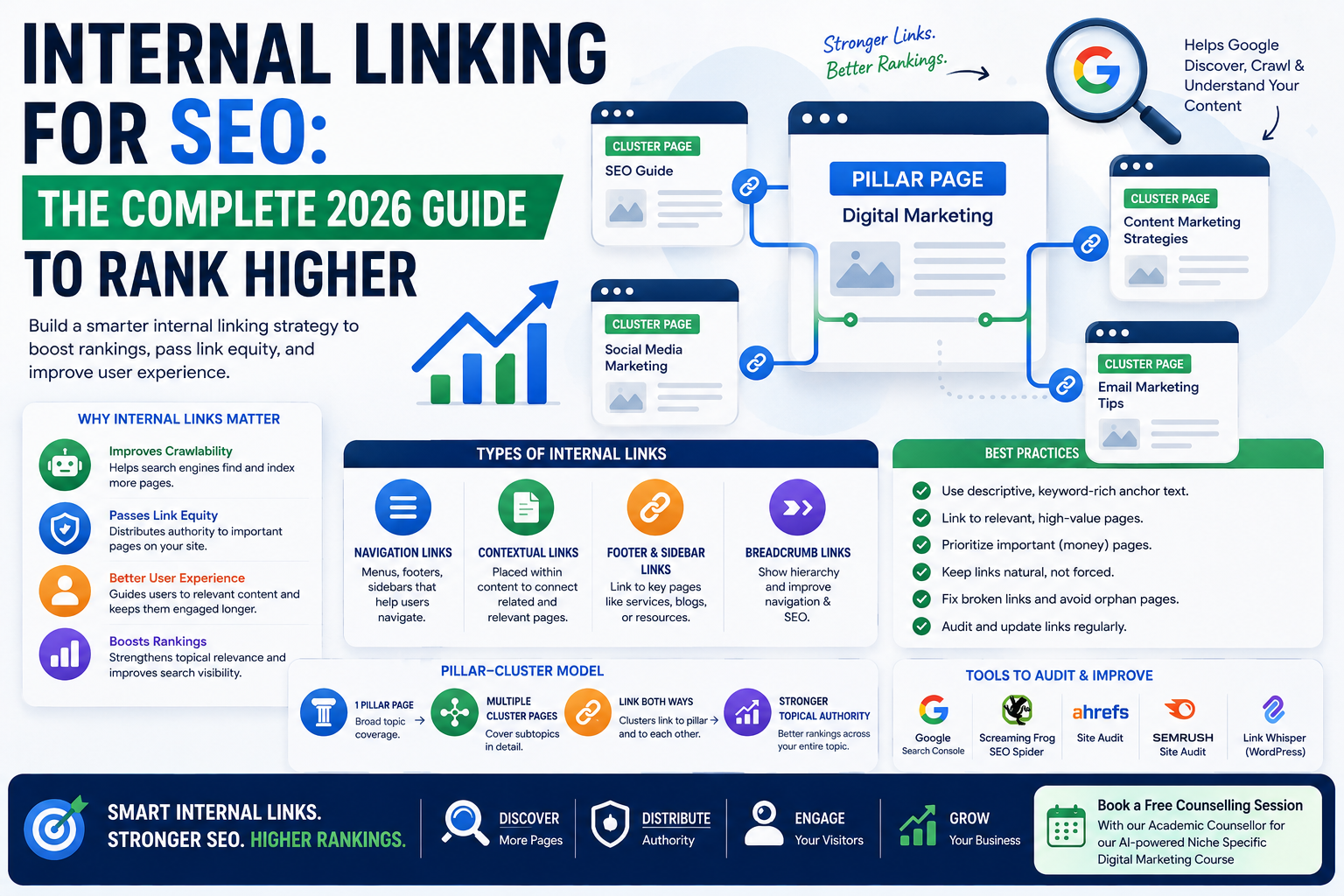
Internal linking refers to the practice of connecting one page of a website to another page on the same domain using hyperlinks. Unlike external or backlinks, which point to other websites, internal links keep users and search engine crawlers moving within your own digital ecosystem.
Search engines like Google rely heavily on internal linking to discover new content, understand the relationship between pages, and determine which pages carry the most authority. When a page receives many internal links, especially from high-authority pages, it signals to search engines that the page is important and deserves better visibility in search results.
Beyond SEO, internal linking shapes the user journey. A well-structured internal linking system guides visitors naturally from one piece of content to another, reducing bounce rates and increasing the average time spent on a website. This combination of crawlability, authority distribution, and user experience is why internal linking remains one of the most underrated yet powerful on-page SEO techniques available to website owners and digital marketers.
TL;DR
- Internal linking connects pages on your own website, helping search engines crawl, index, and understand your content hierarchy.
- A strong internal linking strategy passes “link equity” to important pages and keeps visitors engaged longer.
- Anchor text matters: descriptive, keyword-relevant anchors outperform generic ones like “click here.”
- Pillar-cluster models, contextual links, and navigation links each serve different SEO purposes.
- Common mistakes include orphan pages, excessive linking, and broken internal links.
- Tools like Screaming Frog, Ahrefs, and Google Search Console can audit your internal link health.
- Consistent internal linking can directly improve rankings, dwell time, and conversion rates.
Table of Content
- How Does Internal Linking Actually Affect Google Rankings?
- What Are the Different Types of Internal Links?
- How Should You Structure Internal Links Using the Pillar-Cluster Model?
- What Makes Good Anchor Text for Internal Links?
- How Many Internal Links Should a Page Have?
- What Tools Can Help You Audit and Improve Internal Linking?
- FAQ
- Conclusion
How Does Internal Linking Actually Affect Google Rankings?
Google’s algorithm uses internal links to calculate something called “link equity” or “link juice.” When a page links to another page internally, it passes a portion of its own authority to that page. Pages with more internal links pointing to them, particularly from authoritative or frequently crawled pages, tend to rank better because Google interprets them as more valuable.
Internal linking also helps Google understand topical relevance. When multiple pages about related subjects link to each other using consistent anchor text, Google can map out the semantic relationship between those pages. This is especially important for websites trying to establish topical authority in a specific niche.
Additionally, internal links influence crawl efficiency. Search engine bots have a limited “crawl budget” for every website. If your most important pages are buried deep within your site structure with few internal links pointing to them, crawlers may take longer to find and index them, or may not index them at all. A logical internal linking structure ensures that your most valuable content gets discovered quickly and crawled regularly.
What Are the Different Types of Internal Links?
Not all internal links serve the same purpose. Understanding the different types helps in building a more strategic linking approach.
Navigational links are the links found in your website’s main menu, footer, or sidebar. These help users move between core sections of a site, such as the homepage, services, blog, or contact page. They are essential for usability but typically carry less contextual SEO value than in-content links.
Contextual links are placed naturally within the body of your content, usually pointing to a related article, product page, or service page. These carry significant SEO weight because they are surrounded by relevant text that reinforces the topic of the linked page.
Footer and sidebar links often point to evergreen or high-priority pages like cornerstone content, pricing pages, or category pages. While useful, overusing these can dilute their impact if every page on the site contains identical sidebar links.
Breadcrumb links show users and search engines the hierarchical path of a page within the site structure, such as Home > Blog > Digital Marketing > Internal Linking. These improve both navigation and crawlability.
How Should You Structure Internal Links Using the Pillar-Cluster Model?
One of the most effective internal linking strategies used by SEO professionals today is the pillar-cluster content model. In this approach, a single comprehensive “pillar page” covers a broad topic in depth, while several smaller “cluster pages” cover specific subtopics related to that pillar.
For example, a pillar page on “Digital Marketing” might link out to cluster pages covering SEO, social media marketing, email marketing, and content marketing. Each cluster page links back to the pillar page and may also link sideways to other related cluster pages where relevant.
This model creates a clear, logical site architecture that search engines can easily crawl and understand. It also concentrates topical authority, signaling to Google that your website is a comprehensive resource on a given subject. Websites that successfully implement pillar-cluster models often see improvements in keyword rankings across an entire topic cluster, not just a single page, because the internal linking structure reinforces relevance throughout the network of content.
What Makes Good Anchor Text for Internal Links?
Anchor text is the clickable, visible text of a hyperlink, and it plays a meaningful role in how search engines interpret the linked page’s content. Using descriptive, keyword-rich anchor text helps Google understand what the destination page is about without needing to rely solely on the page’s own content.
Generic anchor text like “click here,” “read more,” or “this page” provides no contextual value to search engines and should generally be avoided, especially for important pages you want to rank. Instead, anchor text should naturally describe the destination page using relevant keywords, while still reading naturally within the sentence.
It is also important to vary anchor text across different internal links pointing to the same page. Using the exact same anchor text repeatedly across many pages can look manipulative or unnatural to search engines, even internally. Mixing exact-match, partial-match, and natural phrase anchors creates a more organic linking pattern that search engines are more likely to reward.
How Many Internal Links Should a Page Have?
There is no universal rule dictating the exact number of internal links a page should contain, but moderation and relevance are key principles. A long-form blog post of 2000 words or more might naturally include anywhere from five to fifteen internal links, depending on how many genuinely relevant related pages exist.
The goal is not to hit a specific number but to link wherever it adds genuine value for the reader. Forcing irrelevant links simply to increase the count can hurt user experience and may be viewed as manipulative by search engines. On the other hand, under-linking a page, especially one with strong topical relevance to other content on your site, wastes an opportunity to distribute authority and guide users deeper into your content ecosystem.
A useful practice is to prioritize linking to your most important “money pages,” such as service pages, cornerstone content, or high-converting landing pages, more frequently than less critical pages, while still maintaining natural, contextually appropriate placement.
What Tools Can Help You Audit and Improve Internal Linking?
Several tools make it easier to analyze, audit, and optimize internal linking across a website. Screaming Frog SEO Spider crawls an entire website and provides a detailed report of internal link counts, orphan pages, and broken links. Ahrefs and SEMrush offer site audit features that visualize internal link distribution and flag pages receiving too few or too many internal links.
Google Search Console includes a “Links” report showing which pages on your site receive the most internal links, helping identify gaps where important pages may be under-linked. For WordPress users, plugins such as Link Whisper can automatically suggest relevant internal linking opportunities based on existing content, significantly speeding up the process of building a comprehensive internal link network.
Using these tools regularly, ideally as part of a monthly or quarterly SEO audit, ensures that internal linking structure evolves alongside new content rather than becoming outdated or inconsistent.
FAQ
What is internal linking in SEO?
Internal linking in SEO is the practice of linking one page on a website to another page on the same website, helping search engines crawl content and helping users navigate between related pages.
How is internal linking different from backlinking?
Internal linking connects pages within the same domain, while backlinking (external linking) involves links from other websites pointing to your site. Both matter for SEO, but they serve different authority-building purposes.
Do internal links really improve SEO rankings?
Yes, internal links help distribute link equity, improve crawlability, and establish topical relevance, all of which can positively influence how a page ranks in search results.
How many internal links is too many on one page?
There’s no fixed number, but linking should always be relevant and natural. Overloading a page with dozens of unrelated internal links can dilute SEO value and hurt user experience.
What is an orphan page and why is it bad for SEO?
An orphan page is a page with no internal links pointing to it. It’s bad for SEO because search engines may struggle to discover, crawl, or rank it.
Conclusion
Internal linking is far more than a minor on-page SEO detail, it is a foundational element of how search engines crawl, interpret, and rank a website, and how users navigate and engage with content. From building pillar-cluster structures to crafting natural anchor text, fixing orphan pages, and using the right audit tools, a deliberate internal linking strategy compounds in value over time, strengthening both rankings and conversions.
Book a free counselling session with an academic counsellor for our AI-powered Niche Specific Digital Marketing course