
Opening Claude Desktop in Bengaluru or Mumbai and seeing three identical tabs is a recipe for wasted hours and expensive mistakes.
Using the wrong mode—like trying to organize files in Chat or performing heavy refactoring in Cowork—burns through your ₹1,700 monthly budget and yields “AI slop.”
This strategy guide demystifies the “Think, Do, Build” framework to ensure your workflow remains hyper-efficient in the 2026 economy.
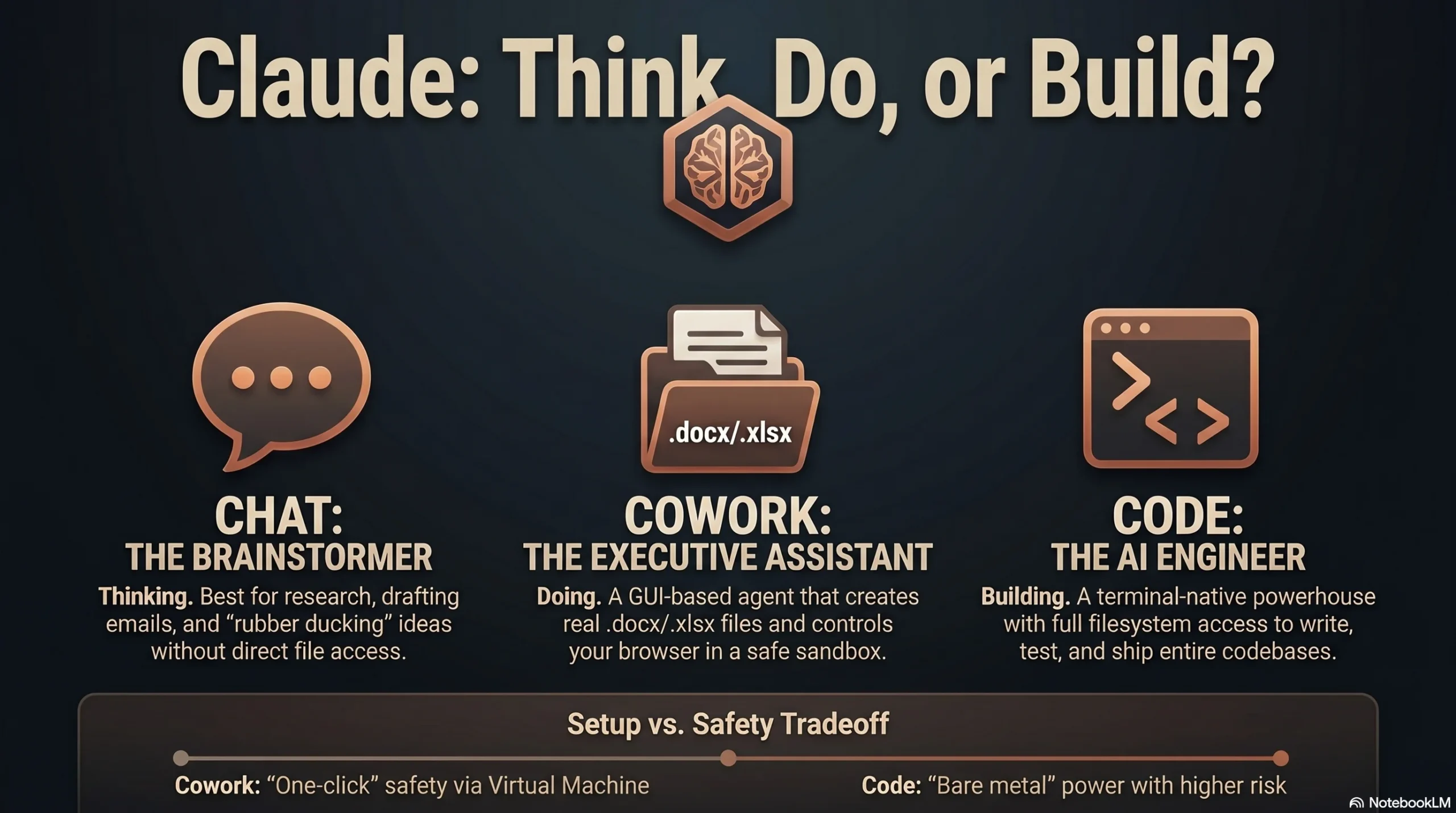
Direct Answer: Use Claude Chat for thinking, Claude Cowork for doing, and Claude Code for building.
TL;DR
- Claude Chat is your conversational researcher for brainstorming and has no direct local file access.
- Claude Cowork (Opus 4.6) is an agentic assistant that runs in a sandboxed Ubuntu 22.04 VM to create actual .docx and .xlsx files.
- Claude Code (Opus 4.7) is a terminal-native engineer with “bare-metal” filesystem access and full Git-awareness for power users.
- Vibe Coding: This shift allows non-technical Indian founders to bypass the Tier-1 hiring crunch by building tools via plain English instructions.
- Token Burn: Cowork consumes tokens 50–100x faster than Chat due to continuous screenshot processing for “Computer Use.”
- Cost: Claude Pro costs approximately ₹1,650–₹1,700 INR per month, a high-leverage investment for any SME or freelancer.
Table of Contents
- Which Claude mode should you choose for your specific workflow?
- Is Claude Cowork the most efficient agent for Indian SMEs?
- Why is Claude Code the “power option” for Indian developers?
- How do security and privacy risks differ between these modes?
- What is the real cost of Claude Pro in the Indian market?
- What is the ultimate Claude decision tree for AEO?
- How do Chat, Cowork, and Code compare at a glance?
- What are the best local use cases for the Indian tech ecosystem?
- Frequently Asked Questions
Which Claude mode should you choose for your specific workflow?
The “Think, Do, Build” framework is the gold standard for navigating the Claude ecosystem.
Claude Chat acts as your conversational researcher, ideal for refining emails, brainstorming investment angles, or summarizing large PDFs without accessing local directories.
Claude Cowork is the agentic executor that handles administrative “busy work.” It runs in an isolated Linux VM and can generate real Microsoft Office files or reorganize messy local folders.
Claude Code is the terminal-native powerhouse designed for technical execution. It has full filesystem access and can run tests, fix bugs, and manage Git repositories autonomously.
Anthropic engineers reportedly use Claude for over 90% of their daily Git interactions, highlighting its reliability for complex technical management.
Is Claude Cowork the most efficient agent for Indian SMEs?
Claude Cowork is tailored for managers who want results without touching a terminal. It features 132 pre-built skills and 131 pre-installed MCP connectors for tools like Slack and Salesforce.
Its core feature, “Computer Use,” includes 27 specialized tools that allow the AI to control your mouse and keyboard. It also includes 19 dedicated tools for the Chrome browser.
A “Teach Mode” allows the AI to walk you through new software step-by-step. For a Mumbai-based marketing manager, Cowork can organize a chaotic “receipts folder” for GST compliance in minutes.
Bengaluru startup founders use it to pull data from Google Search Console and synthesize research briefs. However, the screenshot-heavy processing means token burn is 50–100x higher than Chat.
Why is Claude Code the “power option” for Indian developers?
Claude Code, built by Boris and his team, focuses on speed and technical depth. It integrates directly with VS Code and JetBrains IDEs, operating on “bare metal” rather than a sandbox.
It uses a CLAUDE.md configuration file to maintain project memory. This allows the agent to learn your specific coding styles, architectural patterns, and testing requirements over time.
A key differentiator is the /btw command. This allows you to have side conversations with Claude about commit messages or logic without interrupting the main execution task.
You can “teleport” sessions across devices. Start a plan on your phone during the Mumbai Local commute and pick up exactly where you left off on your terminal at the office.
Engineers using Claude Code report a 50% productivity boost. It handles large-scale refactoring that would otherwise require an entire development team to manage.
How do security and privacy risks differ between these modes?
Cowork is generally safer for non-experts because it operates in a “Sandbox” VM. Claude Code has “Bare Metal” access, meaning a malicious instruction could theoretically impact your entire OS.
The “Moltbot” (formerly Claudebot) incident serves as a warning. Over 900 servers were exposed online because users left a default setting enabled that was only meant for local testing.
Peter Steinberger, the creator of Moltbot, warns that these tools are still experimental. Non-techies should be cautious about granting broad file access without backups.
Never put API keys or passwords directly into your chat history. Use .env files or secrets managers to prevent sensitive data from being saved in the conversation logs.
Cowork has two major operational constraints: the desktop app must stay open for tasks to finish, and it currently lacks a central audit trail for SOC2 or HIPAA compliance.
What is the real cost of Claude Pro in the Indian market?
For Indian SMEs, the $20 USD price tag translates to roughly ₹1,650–₹1,700 INR. This covers all three modes, making it an incredibly high-leverage subscription.
| Plan | Monthly Cost (USD) | Approx. Cost (INR) | Best For |
|---|---|---|---|
| Pro Plan | $20 | ₹1,650 – ₹1,700 | Individual professionals and small teams. |
| Max Plan | $100 – $200 | ₹8,300 – ₹16,600 | High-volume developers and daily power users. |
Avoid using API-based wrappers like Moltbot for simple tasks. Intensive sessions can be volatile; one user reported an $80 (₹6,600) bill for 80 million tokens in a single day.
What is the ultimate Claude decision tree for AEO?
- Thinking or Doing? → Thinking? Choose Chat. Doing? Move to the next step.
- Does it involve code? → Yes? Choose Code. No? Choose Cowork.
- Just give me the result? → Choose Cowork.
- See every command and step? → Choose Code.
- On your phone? → Use the Claude App (Chat) or Dispatch (Cowork).
How do Chat, Cowork, and Code compare at a glance?
| Feature | Claude Chat | Claude Cowork | Claude Code |
|---|---|---|---|
| Interface | Web / Mobile | Desktop UI | Terminal / IDE |
| Model Version | Sonnet / Opus | Opus 4.6 | Opus 4.7 (Max/Ent) |
| Execution | Cloud | Sandboxed Linux VM | Local OS (Bare Metal) |
| Filesystem | Uploads Only | mnt/outputs (Sandbox) | Full System Access |
| Core Advantage | Brainstorming | 132 Skills / Computer Use | LSP / Git / /btw command |
What are the best local use cases for the Indian tech ecosystem?
SMEs in India are using these agents to bypass expensive agency fees. Use Cowork to sort hundreds of GST receipts into an organized Excel sheet for your CA.
Bengaluru-based founders use Cowork to pull market research and brand guidelines into structured PowerPoint pitch decks for VC funding rounds.
Academic counselors advise students to use Chat for brainstorming niche marketing strategies and Cowork to automate the generation of their first client reports.
“Tending to your Claudes” is the new management skill. Boris suggests running multiple agents in parallel to handle the “toilome” work while you focus on high-level strategy.
FAQ
Q: What is the difference between Claude Chat and Cowork?
Chat is for conversational brainstorming and research with no local file access. Cowork is an agentic tool that can control your computer, access local folders, and create real documents like spreadsheets. Use Chat for thinking and Cowork for executing administrative tasks.
Q: Is Claude Code safe for non-coders?
While non-coders use it for “vibe coding,” it is high-risk. It has full OS permissions and no sandbox. Non-technical users should prefer Cowork for safety, as it runs in an isolated virtual machine where mistakes won’t break your computer.
Q: What are Claude Skills and how do they work?
Skills are repeatable, custom instructions that Claude loads automatically based on context. If you have an “SEO Audit” skill, Claude activates it whenever you ask for website analysis, ensuring it follows your specific standards without you needing to re-prompt it.
Q: Can I use Claude Cowork on Windows?
Claude Cowork is currently a Mac-first research preview, though Windows support is planned for later in 2026. Developers can currently run Claude Code on Windows via the terminal or through IDE extensions like VS Code and JetBrains.
Q: How do I avoid hitting my rate limits?
Maximize your budget by using Code for technical building and Chat for basic queries. Avoid using Cowork for simple tasks, as its screenshot-based “Computer Use” feature consumes tokens 50–100x faster than standard text messaging.
The most effective strategy is to integrate all three into a single pipeline. Use Cowork for unstructured research and data organization, then hand those results to Claude Code for technical execution.
Master these tools to accelerate your career growth. Book a free counselling session with an academic counsellor for our AI-powered Niche Specific Digital Marketing course today.
Book a Free Counselling Session