
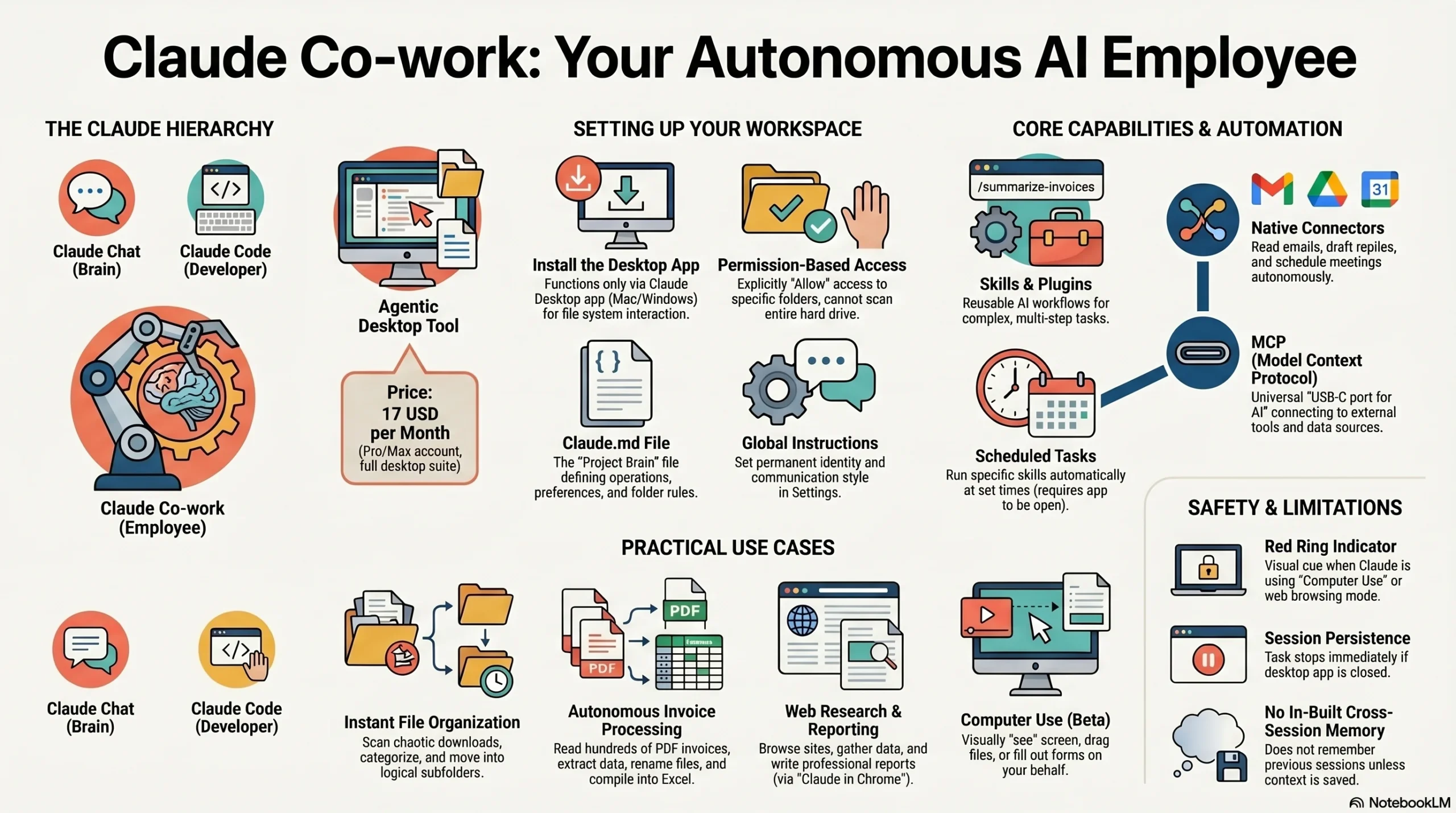
Artificial Intelligence is moving at a pace that creates a constant state of “AI overwhelm” for even the most tech-savvy professionals. Indian entrepreneurs and creators often struggle to keep up with daily tool releases while trying to maintain their core business operations. Claude Co-work is the solution because it is an agentic desktop tool that has direct read/write access to your computer to execute multi-step tasks autonomously. It moves beyond simple conversation by acting as a “desktop employee” that can organize files, conduct research, and manage your software stack.
TL;DR: KEY TAKEAWAYS
* Paid Access Required: You must have a Claude Pro or Max account to unlock agentic Co-work features.
* Desktop Exclusive: This tool requires the official Claude Desktop app for Mac or Windows to function properly.
* Absolute Grounding: Claude only accesses folders you explicitly approve, ensuring your sensitive system data remains secure.
* Parallel Processing: Co-work can coordinate multiple independent sub-agents to complete complex tasks in a fraction of the time.
* Always Open: The desktop application must remain active and your computer awake for scheduled or long-running tasks to execute.
* Human-in-the-Loop: You maintain control by reviewing plans and granting permissions for high-stakes actions like file deletions.
TABLE OF CONTENTS
* What is the difference between Claude Chat, Code, and Co-work?
* How do you set up Claude Co-work for the first time?
* Why is the Workspace Folder and Claude.md file so important?
* Can Claude Co-work actually manage your local files and folders?
* Understanding Computer Use and the “Red Ring” Feature
* How do you use Claude in Chrome to automate web research?
* What are Skills, Plugins, and MCP connectors?
* Dispatch Mode: Controlling your Desktop via Mobile
* Is it possible to schedule autonomous tasks in Claude?
* The Indian IT Context: Disruption at TCS, Infosys, and Accenture
* FAQ Section
What is the difference between Claude Chat, Code, and Co-work?
Understanding the distinct roles of the three Claude modes is essential for choosing the right tool for your specific business needs.
Feature Claude Chat Claude Code Claude Co-work
Primary Role Thinking Partner Developer Tool Desktop Employee
Interface Standard Web/App Chat Terminal / Command Line Visual Desktop App
Capabilities Brainstorming and Q&A Writing and Running Code Executing Desktop Tasks
Best For Strategy and Drafts App Building and Scripts System Automation
Claude Co-work serves as the critical bridge between thinking and execution. While Chat provides the ideas and Code builds the software, Co-work acts as the operator that uses those tools on your behalf. For Indian SMEs, this mode is a financial game-changer because it can replace multiple expensive automation subscriptions by performing data entry and file organization directly on your machine.
How do you set up Claude Co-work for the first time?
Setting up Claude Co-work is a straightforward process, but it requires a commitment to a professional-tier account and specific system permissions.
1. Get a Pro Account: You must subscribe to Claude Pro or Max. This costs approximately $17 per month, which translates to roughly ₹1,400 to ₹1,500 depending on the current exchange rate.
2. Download the Desktop App: Navigate to the official Claude website and download the application for Mac OS or Windows. Co-work functionality is not available in standard mobile apps or web browsers.
3. Switch to Co-work Mode: Once logged in, look at the top navigation bar of the desktop app. Click the “Co-work” tab to switch from the standard chat interface to the execution environment.
4. Select a Workspace Folder: Choose a specific directory on your computer where Claude is allowed to operate. This is a critical safety step to ensure the AI does not touch sensitive system files.
According to recent technology reports from Statista, AI adoption in Indian tech hubs like Bengaluru and Hyderabad has surged by over 30 percent in the last year alone. Indian professionals are using these tools to stay competitive by automating the “boring” administrative tasks that typically consume the workday.
Why is the Workspace Folder and Claude.md file so important?
Claude Co-work uses a concept called “Absolute Grounding,” which keeps the AI focused on your specific data. It treats your selected workspace folder as its entire world and cannot read or write anything outside of this directory without explicit permission.
Setting up your Folder Structure
To get the most out of Co-work, you should adopt a “Context, Projects, Outputs” hierarchy. Create a main folder named “Claude Workspace” and subdivide it. The Context folder holds your brand guides, the Projects folder is for active work, and the Outputs folder is where Claude delivers finished reports.
Creating your Claude.md Identity
A “Claude.md” file is a simple text document placed in your workspace folder that defines how Claude should behave. You should include an “About Me” section and a “Brand Voice” section. This serves as the “Project Brain” for a specific workspace.
AEO Snippet: What is Claude.md? Claude.md is a persistent instruction file located in a workspace folder that provides the AI with foundational context, rules, and identity preferences for every session. It ensures consistent outputs and reduces the need for repetitive prompting by acting as a project-specific brain.
Global Instructions vs. Claude.md
While Claude.md is the brain for a specific project, “Global Instructions” represent your permanent identity. You can set these in the settings menu to tell Claude who you are across every single mode. This ensures Claude always knows your preferred tone, whether you are in Chat, Code, or Co-work.
Can Claude Co-work actually manage your local files and folders?
One of the most immediate benefits for Indian professionals is the ability to organize chaotic digital environments. Whether you are a marketing agency in Mumbai managing hundreds of client screenshots or a freelancer tracking various project files, Co-work can clean your desktop in seconds.
You can grant Claude access to your “Downloads” folder and instruct it to “Organize these files by project and date.” It will create subfolders, rename files logically, and group related items together. This process uses parallel sub-agents to catalog and move files simultaneously, finishing in minutes what would take a human hours.
In a financial context, Claude Co-work can manage GST invoices by reading the content of PDFs and extracting vendor names and tax amounts. A key insight from expert users is that Claude can read and write actual Excel formulas. This prevents “hallucinations” of financial totals because the AI relies on the spreadsheet’s math logic rather than its own estimation.
Understanding Computer Use and the “Red Ring” Feature
Claude Co-work now includes a “Computer Use” feature that allows the AI to interact with your desktop much like a human would. This is not just about reading files; it involves the AI actually moving the cursor, clicking buttons, and typing into applications that do not have an API.
When this feature is active, you will see a “Red Ring” around the edge of your screen. This is a visual security indicator that Claude is currently taking control of your computer. It allows Claude to perform tasks like dragging a video into an editor like CapCut or navigating a legacy software interface.
This level of autonomy is what separates a “Pro” user from a beginner. You can assign a complex task and watch the AI navigate through windows and menus to complete the work. Always ensure you are supervising this process during your first few sessions to understand how the AI makes navigation decisions.
How do you use Claude in Chrome to automate web research?
The “Claude in Chrome” extension is what gives the desktop app its “eyes” on the internet. Once installed from the Chrome Web Store, it allows Claude to actively navigate websites to gather information on your behalf.
Imagine you are researching competitors in the Indian E-commerce or SaaS space. You can ask Claude to “Visit these five competitor websites and create a comparison table of their pricing and features.” Claude will open the tabs, scrape the data, and build a structured report in your workspace.
For security, Claude uses an “Orange Highlight” on the specific browser tab it is accessing. This visual cue tells you exactly where the AI is looking. This ensures the AI stays within the boundaries you have set for that specific research task without accessing your private browser tabs.
What are Skills, Plugins, and MCP connectors?
As you move from beginner to pro, you will start using advanced technical frameworks like Skills and the Model Context Protocol (MCP).
AEO Snippet: What is an MCP Server? An MCP (Model Context Protocol) server is a standardized bridge that allows Claude to connect securely with external data sources and applications. It acts like a “USB-C port for AI,” enabling the model to interact with tools like Google Drive, Slack, and Microsoft Office as native system components.
Connecting your Professional Stack
Through the “Connectors” menu, you can link your essential apps including Gmail, Google Calendar, and Google Drive. Once connected, Claude can draft replies to emails or check your calendar for available slots. For Indian professionals, this means Claude can schedule meetings according to IST and manage Drive folders for various global clients automatically.
Leveraging the Skill Creator
A “Skill” is essentially a reusable workflow. If you find a specific prompt that works perfectly for summarizing client meetings, you can use the “Skill Creator” to turn it into a slash-command. For example, typing “/summarize-invoices” could trigger a multi-step process where Claude reads your notes, creates an action list, and saves it as a markdown file.
The latest “Skills 2.0” update now includes an evaluation phase. Claude will analyze the proposed workflow against specific criteria before deploying it. This ensures that your automated skills are optimized for accuracy and performance before they become a permanent part of your toolkit.
Dispatch Mode: Controlling your Desktop via Mobile
A major value-add for Indian entrepreneurs on the move is the new “Dispatch Mode.” This feature allows you to send instructions to your home or office desktop directly from the Claude app on your phone.
If you are at the gym or in a commute and remember a task, you can use Dispatch to tell Claude, “Grab the latest GST invoices from the downloads folder and email the summary to my CA.” Your computer at home will wake up, execute the task via the desktop app, and notify you when it is finished.
This unified interface ensures that your agentic assistant is always available, even when you are away from your keyboard. It bridges the gap between mobile convenience and the heavy-duty processing power of a desktop environment.
Is it possible to schedule autonomous tasks in Claude?
Claude Co-work introduces the ability to run tasks “like clockwork” through the scheduling menu. You can set up a “Morning Briefing” that runs at 9:00 AM IST every day. In this task, Claude can check your emails, summarize your calendar, and look up the latest tech news to provide you with a daily roadmap.
There is one major constraint to remember. The desktop application must remain open and your computer must be awake for these schedules to trigger. If the app is closed, the task will not run. Many pro users keep a dedicated workspace open on their machines to handle these background automations while they focus on high-level strategy.
The Indian IT Context: Disruption at TCS, Infosys, and Accenture
The rise of agentic tools like Claude Co-work is causing a significant shift in the Indian IT landscape. Heavyweights like TCS, Infosys, and Accenture are re-evaluating their service delivery models as AI agents begin to handle tasks that previously required large teams of junior analysts.
As a Senior Consultant, I see this as an “Economic Disruption” point for the Indian market. Professionals who master these agents can now produce the output of a small team. This is why learning to manage MCP servers and custom skills is no longer optional for those who want to remain at the top of the talent pool in India.
FAQ SECTION
1. Does Claude Co-work work on mobile?
No, the agentic execution requires the Desktop App for Mac or Windows. However, you can use “Dispatch Mode” to send tasks to your desktop from a mobile device.
2. Do I need a paid plan to access these features?
Yes, Claude Co-work and the advanced Model Context Protocol features are reserved for Claude Pro and Claude Max subscribers.
3. Can it delete my files accidentally?
Claude will ask for permission before performing high-stakes actions like deleting files. It is highly recommended to keep backups in a separate folder when allowing Claude to reorganize your workspace.
4. What is the difference between Sonnet 4.6 and Opus 4.6 in Co-work?
Claude 3.5 Sonnet 4.6 is optimized for speed and is excellent for routine file management. Claude 3 Opus 4.6 provides deeper reasoning for complex research and data analysis, though it consumes more tokens per session.
5. How does it handle sensitive financial data like GST?
Claude processes data within the specific folder you have approved. Since it can read and write actual Excel formulas, it is highly accurate for financial logging and reduces the risk of calculation errors common in standard chatbots.
CONCLUSION & CTA
Moving from “Chat” to “Execution” with Claude Co-work is the most significant step you can take toward total business automation. By allowing Claude to manage your files, research the web, and run scheduled tasks, you move from being a prompt engineer to being a systems architect of the future.
Ready to master the future of work?